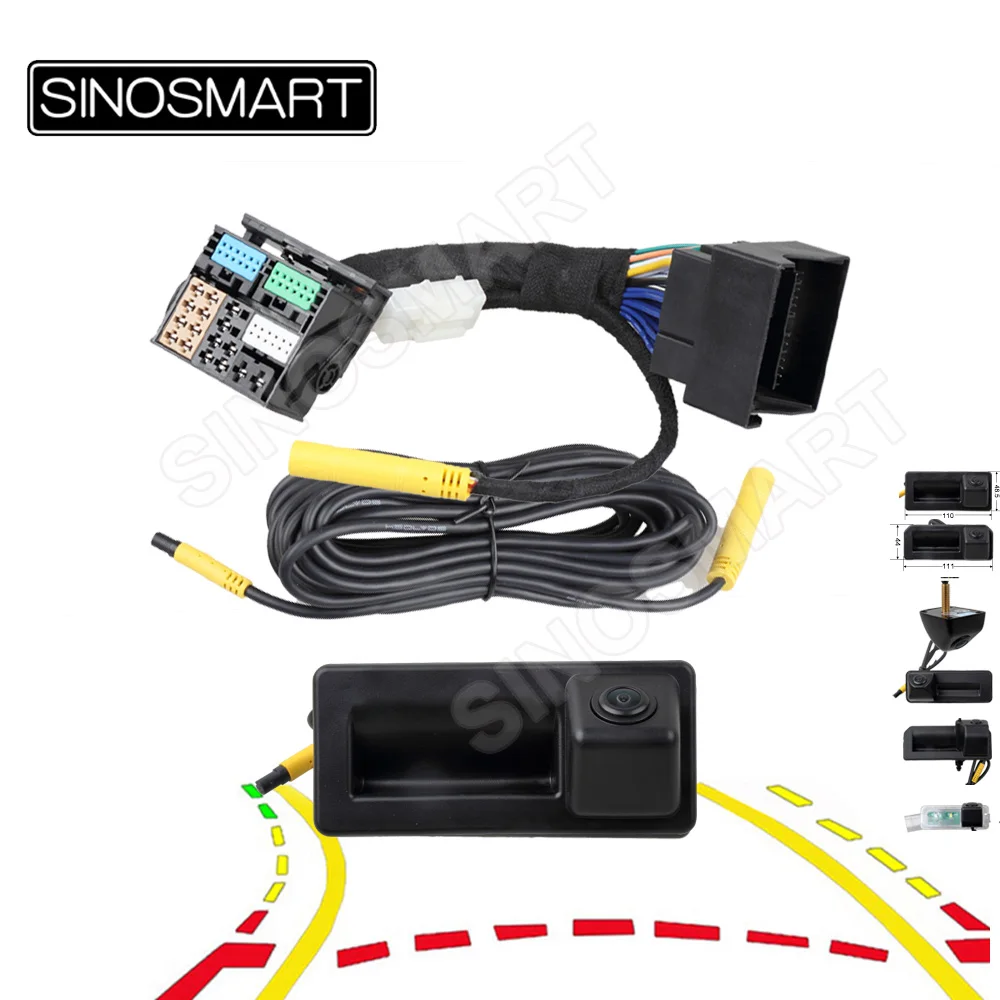
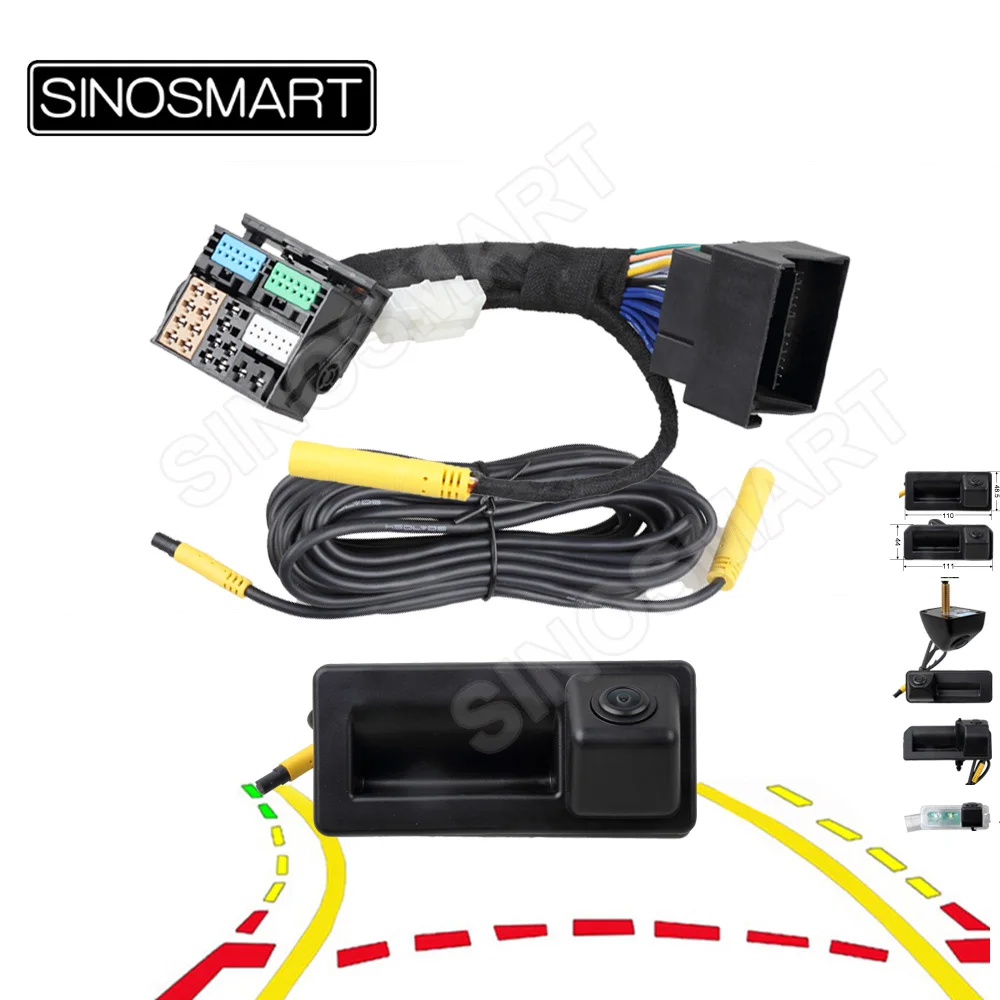
SINOSMART Dynamic Trajectory Reverse Camera for VW Tiguan Skoda Octavia Superb Audi A3 Q2 Q3 Seat Leon, CanBus, Plug & Play MQB
$135.03 & Free Shipping
Free shipping on orders over $50!
- Satisfaction Guaranteed
- No Hassle Refunds
- Secure Payments
Description
- Is Itself Accessories: Yes
- High-concerned chemical: none
- Guiding Line: Yes
- Lens Material: Glass
- Length of Video Cable: 6M
- Shell Material: Plastic
- Wire or Wireless: Wire
- Alarm Type: Vehicle Backup Cameras,Rear Side
- Brand Name: SINOSMART
- Origin: Mainland China
- Material: ABS
- Certification: CE
- Viewing Angle : 125°
- Application: Dynamic Trajectory Camera for Volkswagen 187B 280 PQ MQB, New Audi
- Image Sensor: PixelPlus PC3089
- Resolution: 720X480 (NTSC)
- Connection Type: Plug and Play
- Installation Place: Trunk Hand or Licence Plate Lamp
- Car Maker 1: For Skoda Volkswagen MQB Platform
- Car Maker 2: For 187B Monitor Sagitar, Passat
- Car Maker 3: For 280 Monitor Bora,TAYRON,Sagitar, Tharu, T-CLRSS,Jetta VS5

✅ Product Description
This OEM-style reversing camera is specially designed for Volkswagen, Skoda, Audi, and SEAT vehicles built on the MQB platform, and equipped with factory-installed MIB infotainment systems – including MIB1, MIB2, MIB2.5, and some basic MIB3 systems.
📌 Compatibility by model year (approximate):
* Volkswagen: typically 2017 and newer
* Audi, Skoda & SEAT : typically 2013 and newer
(May vary by market. Please confirm system type before purchase.)
📌 Note: We use the general range in Europe for compatibility, but actual release years may vary by region .
If your vehicle is from a transition year (e.g. 2013, 2017, 2019/2020), please double-check the exact version to ensure compatibility. (The date of manufacture, not the date of purchase)
It is ideal for vehicles that do not have a factory-installed reverse camera, but still use the original OEM infotainment screen. The system integrates through the original wiring harness and communicates via CANBUS to support:
✅ Automatic reverse camera activation when shifting into reverse
✅ Different OEM-style reversing interfaces depending on the detected vehicle, including different guideline colors, line styles and display layouts (Automatic vehicle recognition for vehicle models)
✅ Dynamic parking guidelines that respond to steering input
✅ Automatic integration with the original parking sensor display, where supported
✅ No external power tapping or manual coding required in most cases
✅ Plug & Play installation
Simply connect the supplied camera harness to the original multimedia unit. No wire cutting or soldering is required. In most compatible vehicles, the system automatically detects the vehicle configuration and activates the reverse camera function.
❌ Not Compatible With:
* Advanced MIB3 head units (2020+ with Ethernet camera interface, typically Brand is Audi)
* Android-based aftermarket radios
* Vehicles that already have a factory camera installed
* Entry-level Skoda VW or Audi models (such as 812 819 series radio)
📎 Please scroll down to the “Compatibility Notice” section below for detailed warnings.
❗If you’re unsure, please scroll down to the "Not Sure If It Fits Your Car? We’re Here to Help!" section below for details.
Note: The language shown in the video is the original system language of the car. Since the demo vehicle is from China, the interface is in Chinese.
🛡️ Why Choose SINOSMART? – OEM-Style Fit, Reliable Hardware, Plug & Play
✔ Plug & Play – no wire cutting or soldering required
✔ Automatic vehicle recognition & optimized for Original OEM Screens
*Typical 720X480 output, designed to match VW Group factory analog video systems for stable OEM-style image quality.
✔ Dynamic parking guidelines via CANBUS
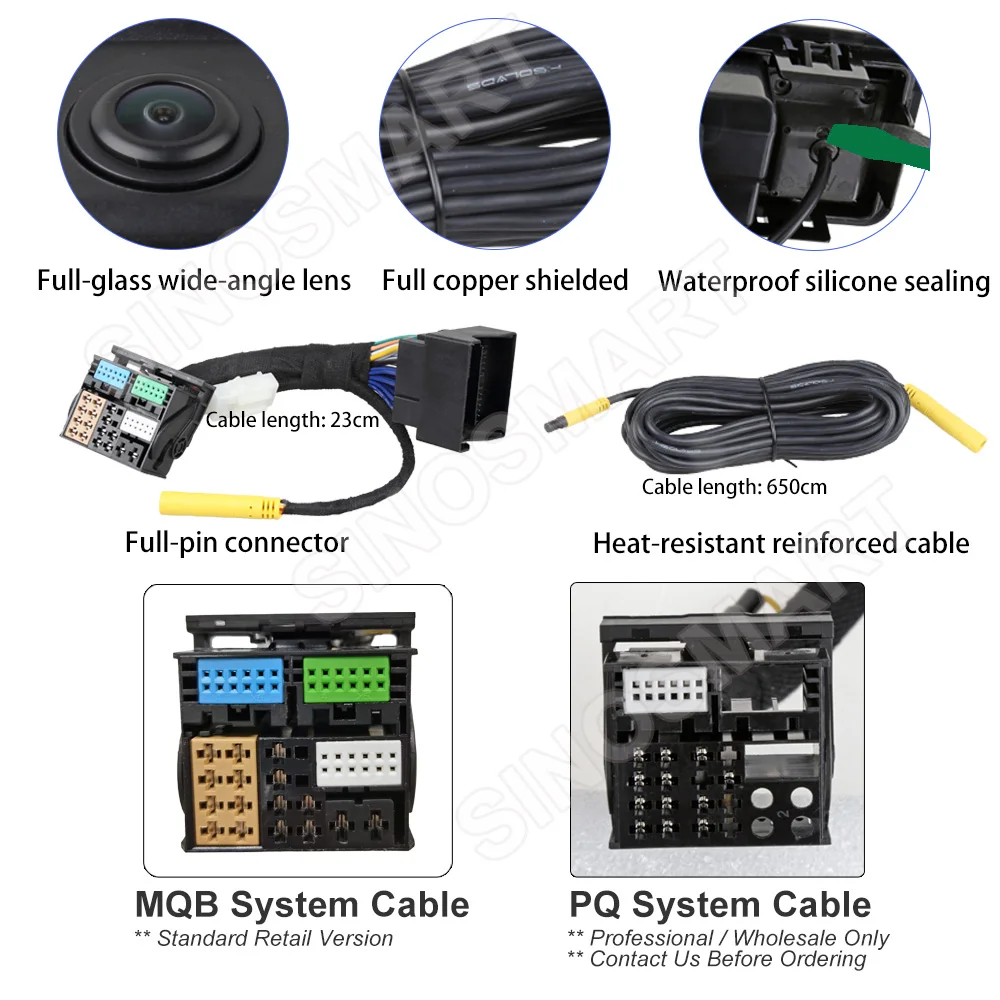
✔ Full-glass wide-angle lens for clear, low-distortion images
✔ Full-pin connector for wider vehicle compatibility
✔ Full-copper shielded, heat-resistant 6.5 m video cable
✔ Waterproof silicone sealing for long-term outdoor use
✔ Each camera individually tested before shipment
✔ Fast 3-7 day delivery to most EU countries via AliExpress official logistics
Not Sure If It Fits Your Car? We’re Here to Help!
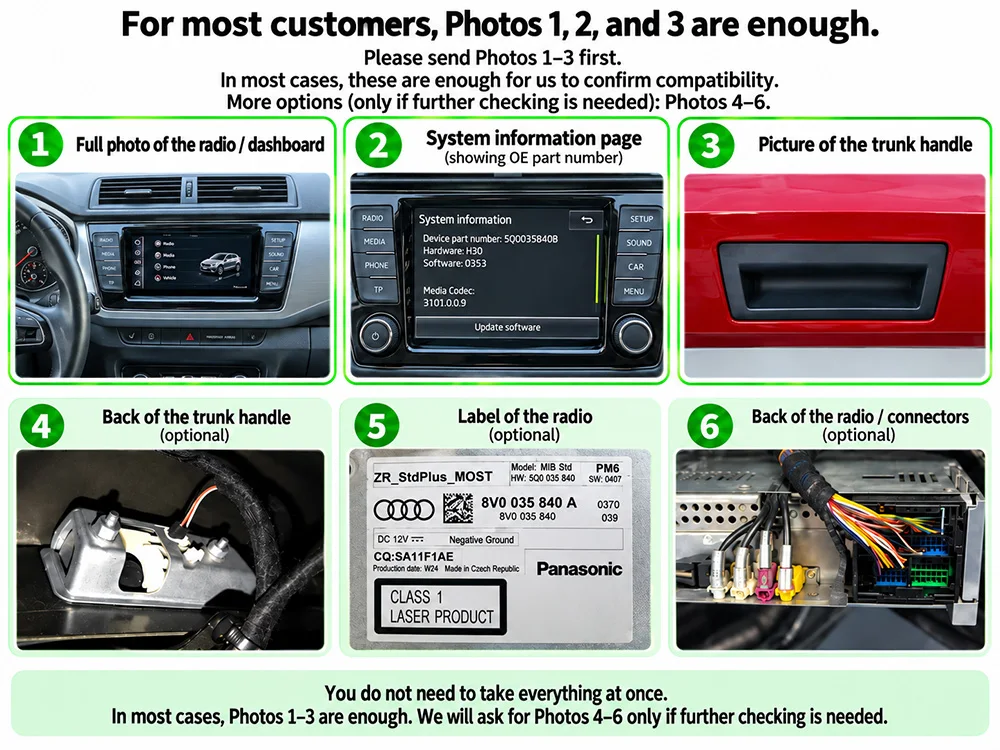
In most cases, we can confirm compatibility with just 3 easy photos – no disassembly needed.
Please send:
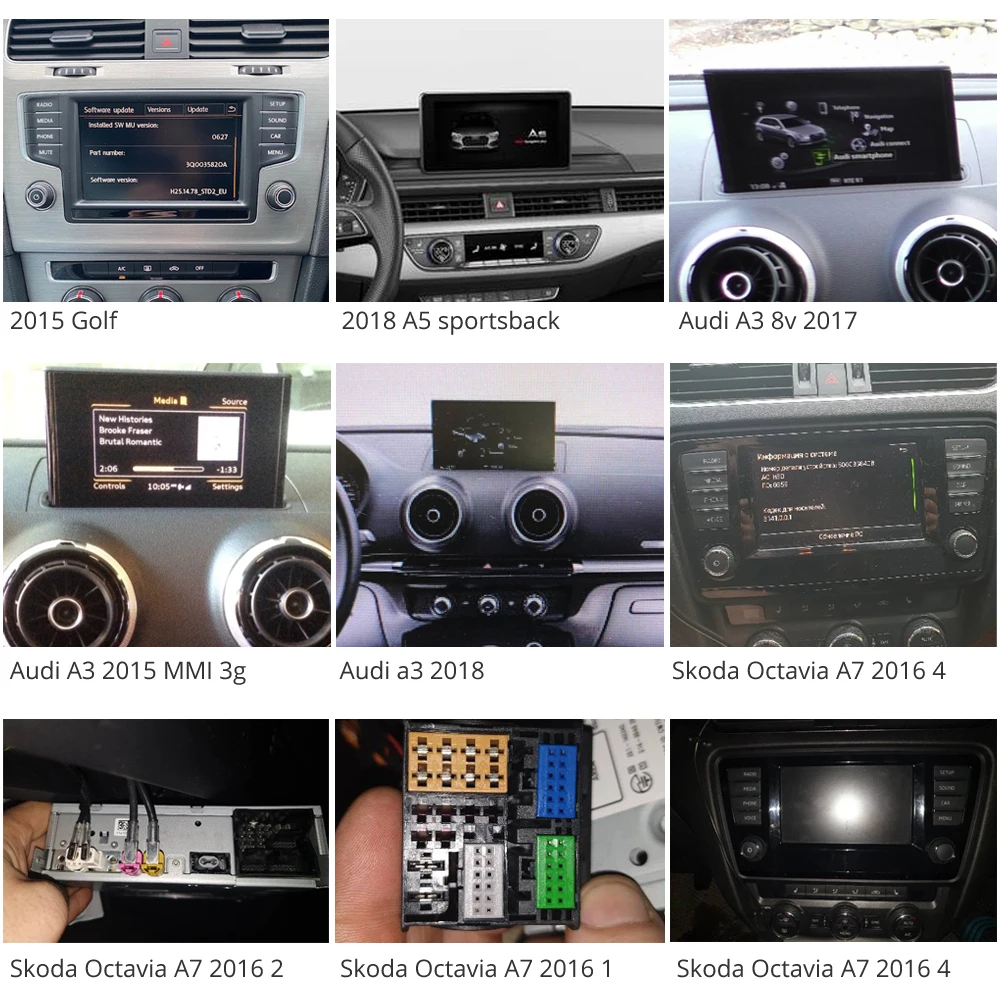
1) A clear photo of your radio / center screen (front view)
Please include the full panel around the screen, including buttons/knobs if possible. A wider photo is better than a close-up of the screen only.
2) A clear photo of your trunk handle (outside view)
This helps us confirm the handle shape and size.
3) A photo of the system information / device part number screen
You can usually find this in:
Settings -> System Information / Version / About Device
If possible, please make sure the OE / device part number is visible in the photo.
,
For most customers, Photos 1 + 2 + 3 are enough.
Please send these 3 photos first.
Only in special cases, we may ask for extra photos to double-check compatibility.
Optional (only if needed):
4) A photo of the radio label
5) A photo of the back of the radio / connectors
6) A photo of the back side of the trunk handle
Please don’t worry – in most cases, you do not need to remove parts at the beginning.
We will only ask for additional photos if they are really necessary.
✅ Installation Guide – Test First, Install Second – Simple and Safe
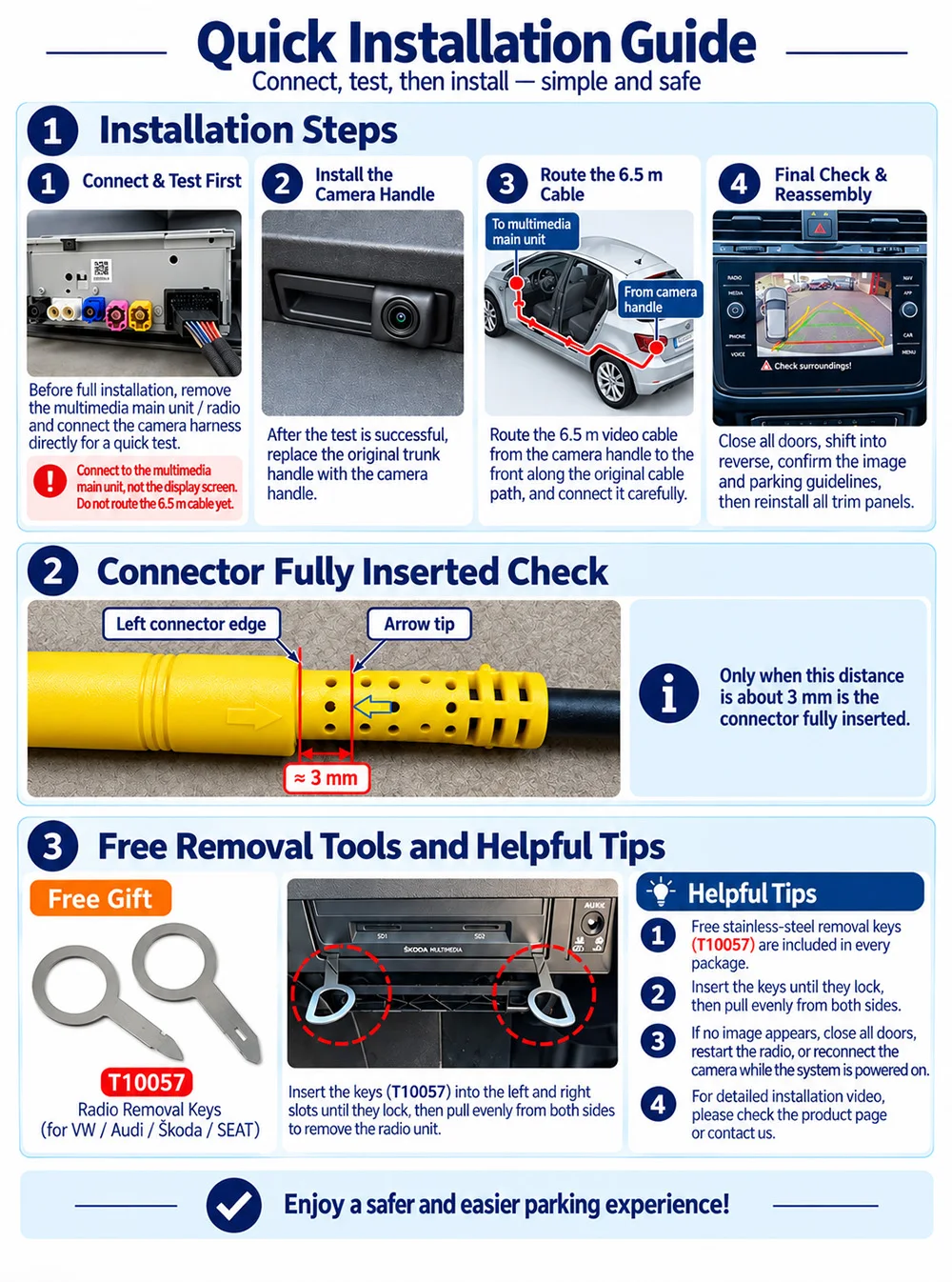
① Connect & Test First
Before routing any cables or removing the original trunk handle, first connect the camera harness directly to the multimedia main unit and test the system.
Do not route the 6.5 m cable before the first test.
② Replace the Original Trunk Handle
After the test is successful, replace the original trunk handle with the camera handle. Test again if necessary.
③ Route the 6.5 m Cable
Route the 6.5 m video cable from the trunk to the multimedia main unit along the vehicle’s original cable path.
④ Final Test & Reassembly
Close all doors, shift into reverse, confirm the image and parking guidelines, then reinstall all trim panels.
⚠ Important
• This camera normally connects to the original multimedia main unit / radio unit, not directly to the display screen.
💡 Free Removal Tools & Helpful Tips
• Free stainless-steel removal keys are included in every package. (T10057-Type for VW / Audi / Skoda / SEAT)
Insert the removal keys into the left and right release slots until they click into place, then pull the unit out evenly from both sides.
• Close all doors and the trunk when testing reverse mode. Restart or reset the radio if needed.
• Make sure all connectors are fully inserted.
When fully inserted, only about 3 mm should remain visible between the connector edge and the arrow mark.
• If no image appears, close all doors, restart the multimedia system, or reconnect the camera while the system is powered on.
🔍 Want to better understand terms like MQB, MIB2, MIB3, or Automotive Ethernet?
Please scroll to the bottom of this page for a detailed technical explanation. We hope that will help you understand this professional background knowledge.
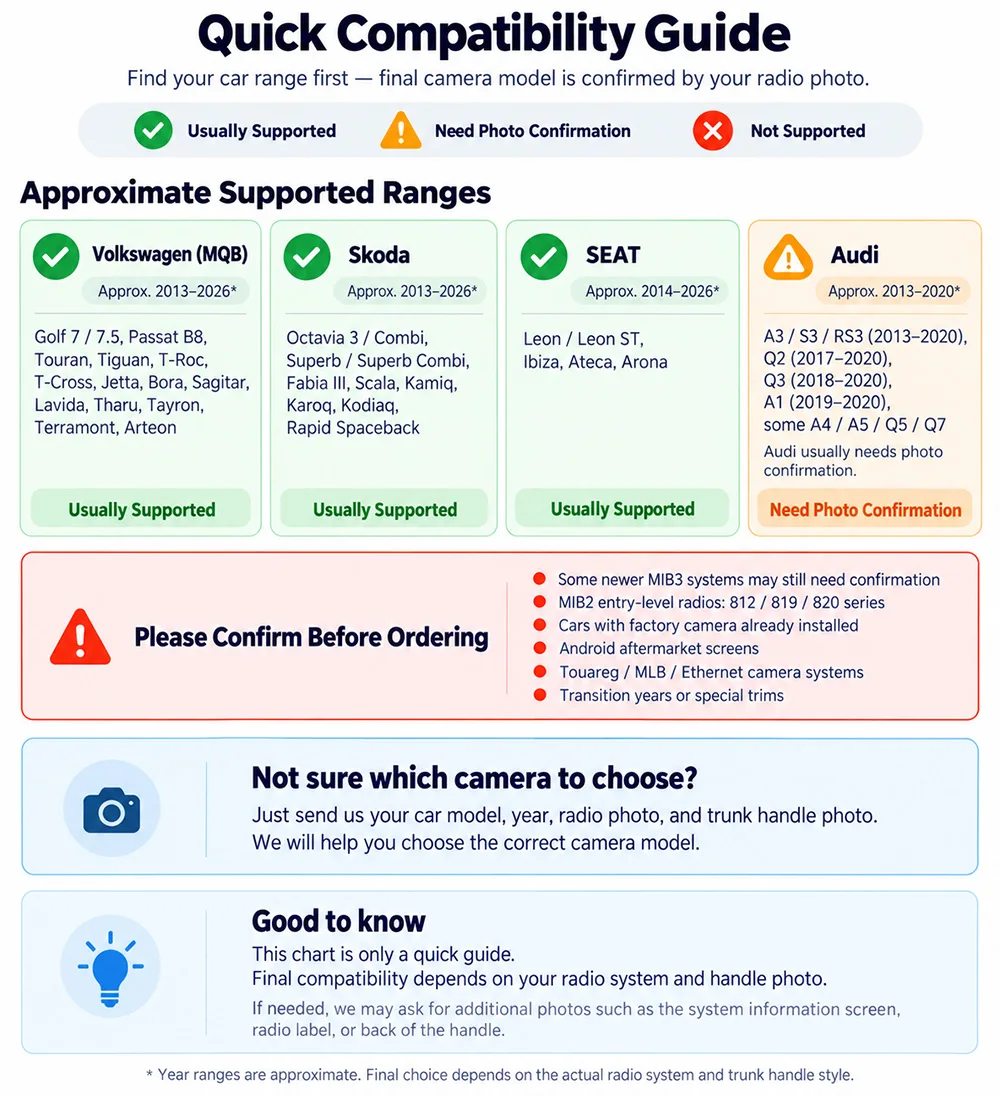
✅ Quick Compatibility Guide – This guide is for quick reference only.
📌 Final compatibility depends on your radio system, trunk handle style, and vehicle configuration.
📌 Typical Compatible Range
Volkswagen / Skoda / SEAT
Most MQB-based models from about 2013 onward
(Some newer models up to 2026 may still be compatible, depending on the radio system.)
📌 Important Notes
Not all cars within the same year range are compatible.
Some newer MIB3 / Ethernet-based systems are not supported.
Some entry-level radios may not support reverse camera activation.
The correct camera version still depends on your car’s actual radio system and trunk handle style.
Audi
Compatible range is more limited.
Most confirmed compatible models are mainly from about 2013-2020.
For Audi A3, many 2013-2020 models may be compatible depending on the system and configuration.
Audi A3 Series (8V platform), except for the lowest configuration model (NO parking system "P" button)
A3 Sportback or Sedan (2013 to 2016) – Camera C
A3 Sportback or Sedan (2016 to 2019) – Camera C
A3 LM (2020) – Camera C
Audi Q3 Series
Q3 (2014 to 2017, 1st generation) – Camera C
Confirmed to work with MIB STD and MIB2 head units.
@@Note: Models from 2012 to 2015 are often based on the PQ or early MLB platform, not compatible with MIB STD or MIB2. These systems cannot recognize camera signals.
Q3 (2018 to 2021) – Camera B
This generation is based on the MQB platform and generally supports our MQB camera system.
@@However, starting from late 2019, some Q3 units were equipped with the new MIB3 system, even though the user interface looks very similar. These MIB3 units are not compatible with our camera.
⚠️Important: If you’re unsure about your head unit type, please check the label on the back of the unit or consult us before purchasing.
Q3 (2022 and newer) – Not compatible
Uses the latest MIB3 platform, which is not compatible with MQB camera systems.
Audi Q2
Q2 (2017 to 2021) – Camera B
Confirmed to work with or without MMI Plus and virtual cockpit
Audi A1 (2nd generation, MQB)
A1 (2019-2020) – Camera B
Only selected MQB-based models confirmed to work
Older or MIB3 models are not supported, even with proper wiring and coding.
Audi A4 and S4 (B9 platform)
A4 Avant B9 (2017) – Camera A
Image appears only after shifting into reverse gear twice
S4 B9 with MMI Basic – Camera A
One customer reported camera angle too low and adjusted manually
Audi A5
A5 Sportback (2017) – Camera B
One customer reported camera only activates when reverse sensor button is manually pressed
Audi Q5 and Q7
Q5 (2017 to 2021) – Camera B
Q7 (2017 to 2021) – Camera A
Compatibility note
For newer Audi models from 2021 and newer using MIB3 platform, our MQB cameras are not compatible
Please contact us before ordering to confirm compatibility
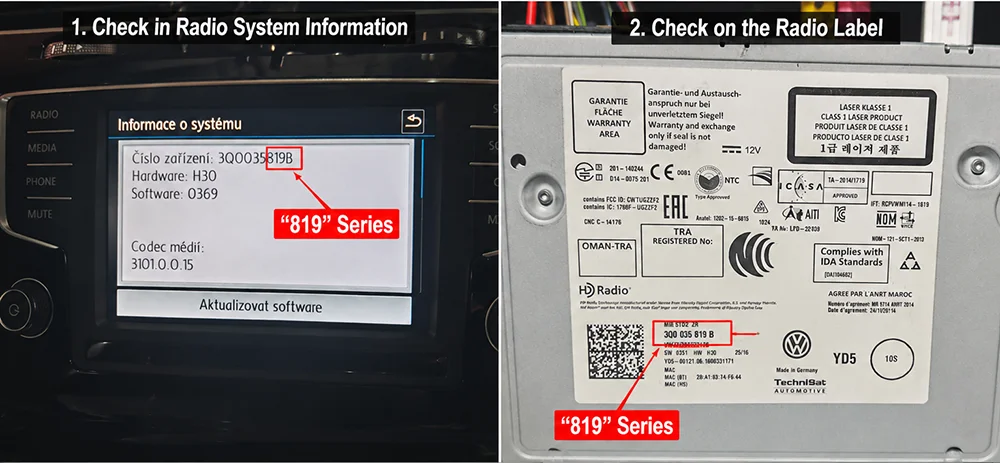
❌ NOT Compatibility with MIB2 Entry-Level Radio Units (812 819 820 Series)
Some Volkswagen MQB vehicles are equipped with entry-level MIB2 radio units such as 3Q0 035 812, 819, 819A, 819B, 819C and 820. These units may not support rear view camera video input. Please don’t buy!
Golf Mk7 (2013 / 2015 / 2016) – Camera G
Golf 7.5 (2017) – Flip Logo or Camera D
Golf Mk7 GTD – Flip Logo or Camera D
Passat CC (2013 / 2015 / 2016) – Camera G
Passat (2016–2018) – Camera A
Passat (2019–2021) – Camera B
Passat B8 Estate (2017–2021) – Flip Logo Camera or Camera D
Touran (2018–2021) – Camera A
Touran L (2018–2021) – Camera A
Lavida (2017) – Camera A
Lavida Plus (2018–2021) – Camera A
Sagitar (2016–2018) – Camera A
Sagitar (2019–2021) – Camera B
Jetta VS5 (2019–2021) – Camera B
Jetta VS7 (2019–2021) – Camera B
Tiguan (2017–2021) – Camera A
Teramont (2017–2021) – Camera A
Bora (2019–2021) – Camera B
Tayron (2019–2021) – Camera B
Tharu (2019–2021) – Camera B
T-Cross (2019–2021) – Camera B
C-TREK (2017–2021) – Camera A
Sharan (2017–2021) – Camera A
Caddy Maxi (2019) – Camera A
Arteon (2021) – Flip Logo Camera or Camera D
Touareg (2017–2021) – ❌ Not compatible (MLB platform, does not support MQB cameras)
Other Camera G Compatible Models
VW Scirocco (2013–2016) – Camera G
VW Lamando (2015–2016) – Camera G
VW Magotan (2017) – Camera G
Skoda
Skoda Octavia Series
Octavia 3 (5E) (2013–2016) – Camera E
Octavia 3 (5E) (2016) – Camera A or E
Octavia 3 FL (2017–2020) – Camera A
Octavia 3 Combi (2013–2020) – Camera A or E
Octavia A7 (2018–2019) – Camera A
Octavia serie 3 (2019) – Camera A
Skoda Superb Series
Superb (2016–2018) – Camera A
Superb B8 (2015–2023) – Camera A
Superb Combi (2021+) – Camera B
Superb Liftback (2020+) – Camera B
Note:
Some 2019+ Superb models (e.g. UK market) may require Camera B instead of Camera A.
Fabia (2015–2018) – Camera B
Fabia (2016) – Camera B
Fabia (2020+) – Please confirm with photo
Scala (2019–2022) – Camera B
Scala (2022 with Swing infotainment) – Camera B
Kamiq (2017–2019) – Camera B
Kamiq (2021) – Camera B
Kamiq (2023 SEDrive) – Camera B
Karoq (2017–2019) – Camera B
Kodiaq (2017–2019) – Camera B
Rapid Spaceback (2018) – Camera B
Columbus (2013) – Camera E
*** For newer Skoda models with MIB3 systems (typically 2021+), please confirm compatibility before ordering.
SEAT
SEAT Leon Series
Leon ST MK3 (2014) – Camera A
Leon Mk3 (2015) – Camera D
Leon Sportstourer (2016–2020) – Camera D
Ibiza FR (2019) – Camera D or G
Ibiza (2015) – Camera D
Ateca (2020) – Camera A
Arona (2018) – Camera B
SEAT Ibiza / Arona (2022+)
Please confirm with photos. Some models may use MIB3 systems which are not supported by MQB cameras.
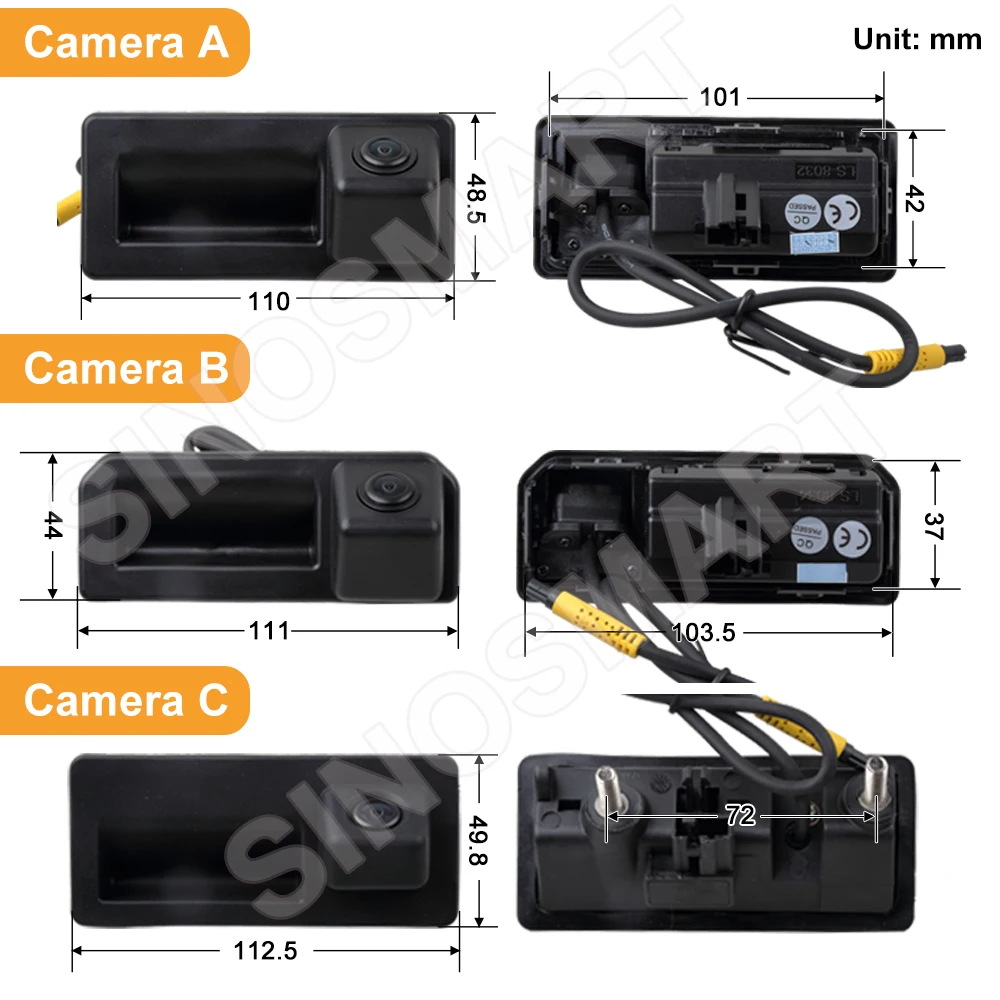
✅ Camera Version Guide – Choose the Correct Shell
All camera versions use the same core electronics and basic functions.
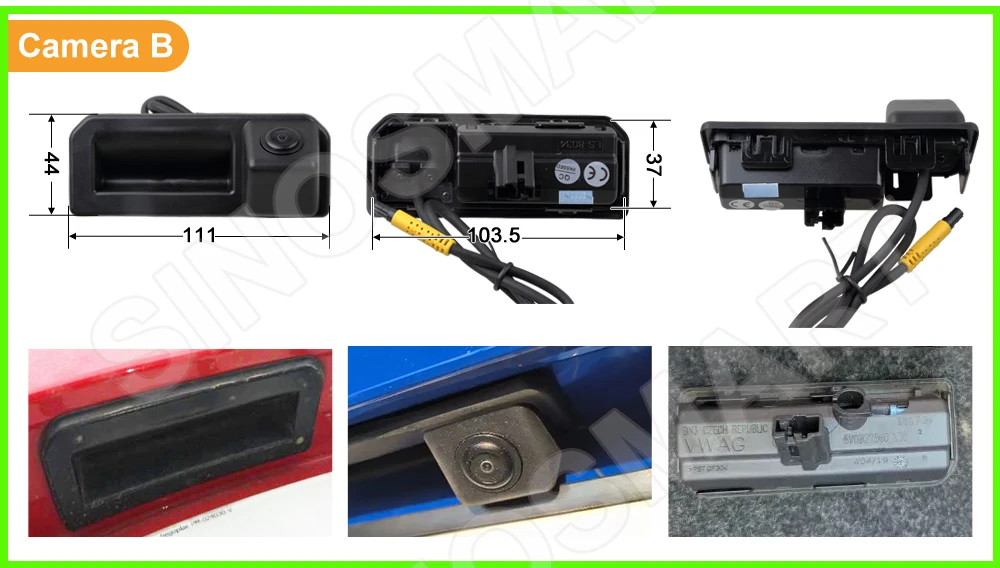
The main difference is the outer shell / handle shape, so choosing the correct version depends mainly on your original trunk handle style.
If you are not sure, please compare your original handle with our photos, or send us your car model, year, radio photo, and trunk handle photo before ordering.
✅ Quick Notes:
• A / B / C / E / F are OEM-style replacement handle cameras.
• D is a universal add-on camera for special cases.
• F is based on Camera B and adds a washer nozzle.
• G includes built-in LED license plate lights.
Important:
• Model B has its own unique wide and shallow shell design.
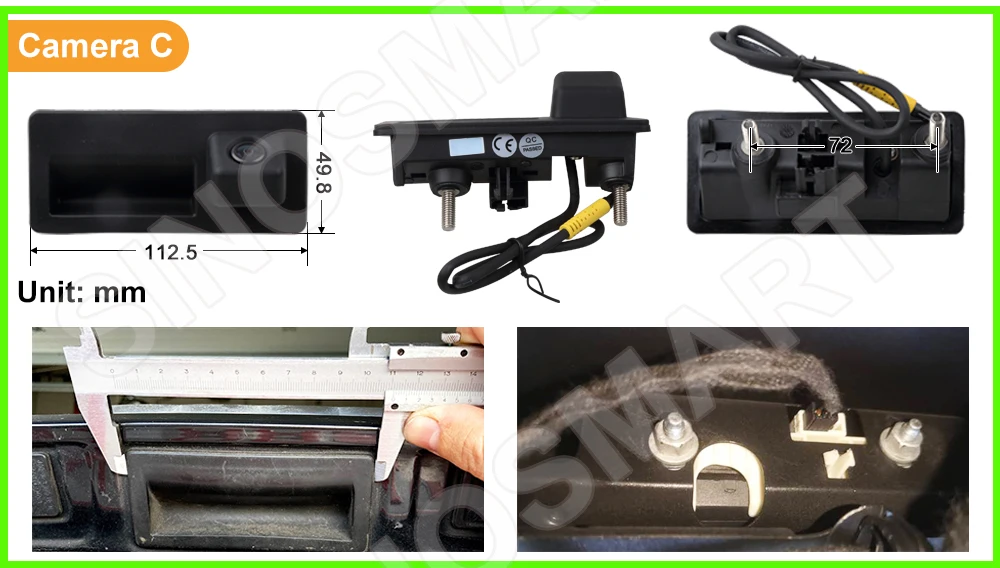
• Model C uses a different mounting structure from A / B.
• Models A and C may look similar in some photos, but they are not interchangeable.
✅ For most regular customers:
Please choose mainly by handle shape and product photos, not only by car model name.
If the shape matches your original handle, installation is usually straightforward.
If your car is unusual, modified, or you are not sure, please contact us first.
📏 Size Tolerance:
Please allow a small size difference of about 1-2 mm.
This is normal and usually does not affect installation.
The most important point is whether the outer shape and mounting style match your original handle.
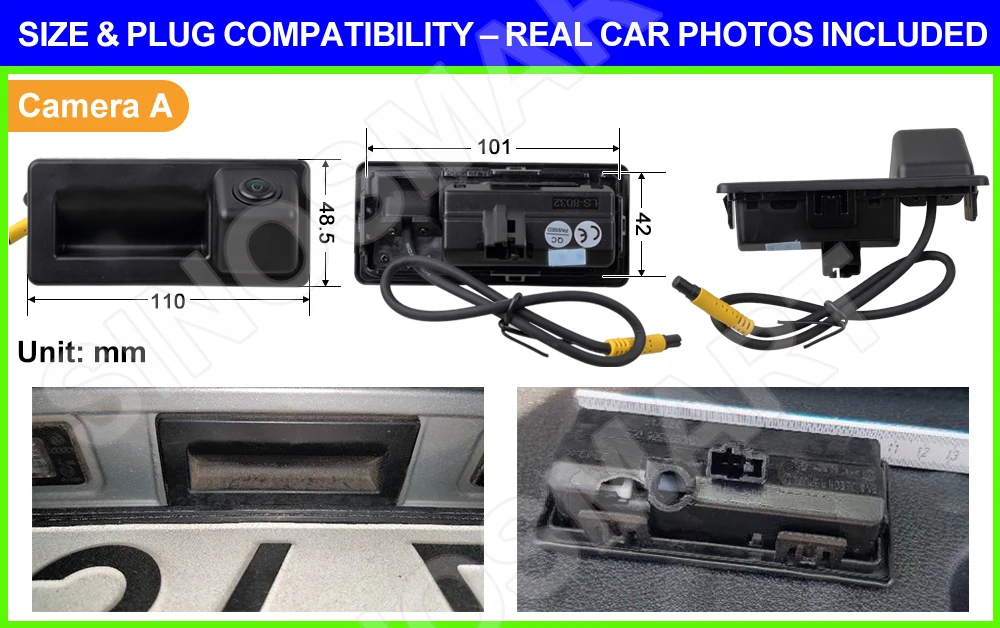
Camera A, B and C – OEM-style replacement handle camera
Camera C is a special OEM-style version mainly used on certain Audi platform handle structures.
Its mounting design is different from A and B, so they are not interchangeable.
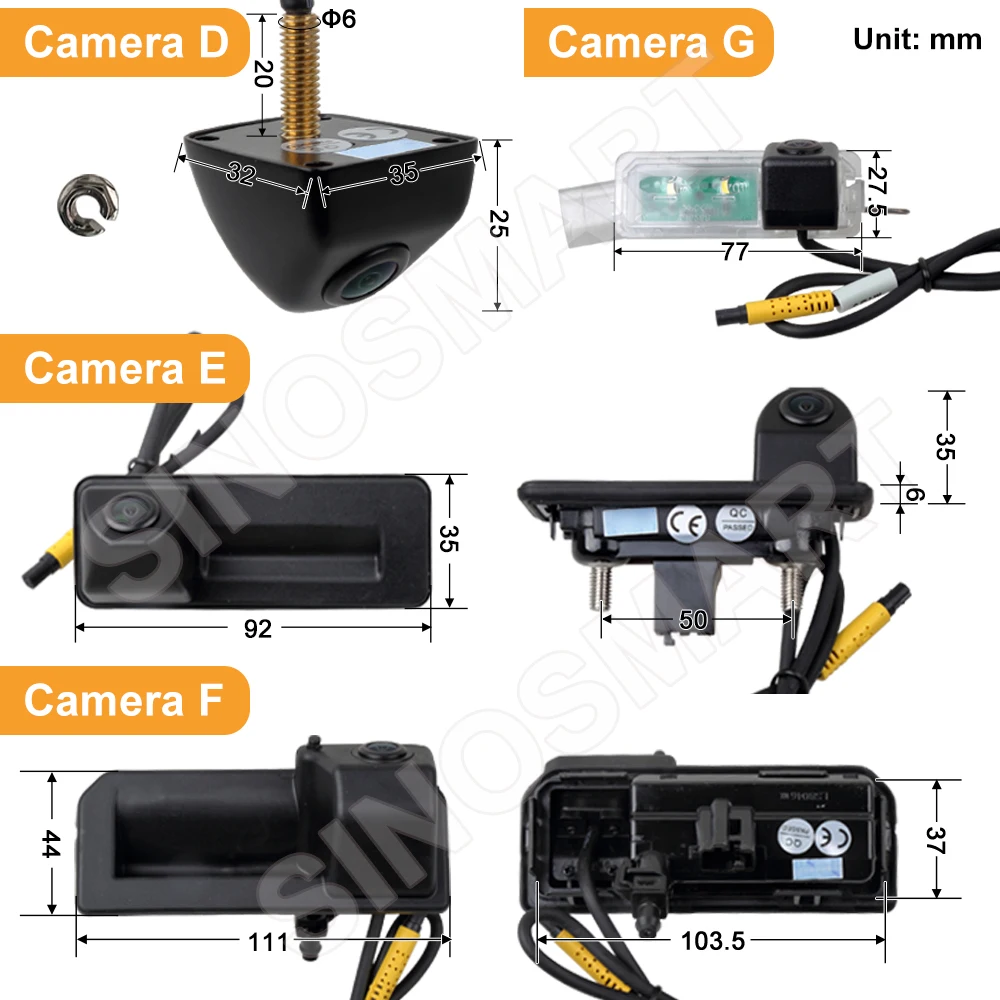
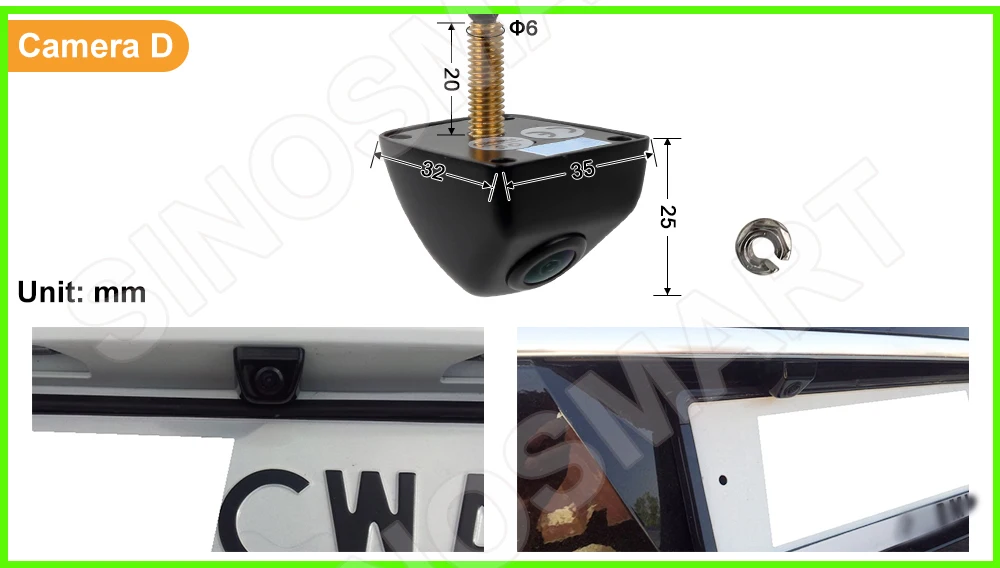
Camera D – Universal add-on camera.
For vehicles that do not use a matching OEM-style handle camera.
Installs above the license plate or near the plate light area.
Requires a small hole for mounting and is more suitable for custom installation.
Key Features:
🛠 Requires only a small 6mm hole for mounting
📐 Can be installed in the center of the vehicle for the best viewing angle
🛡 Durable metal shell, better suited for long-term use in automotive environments
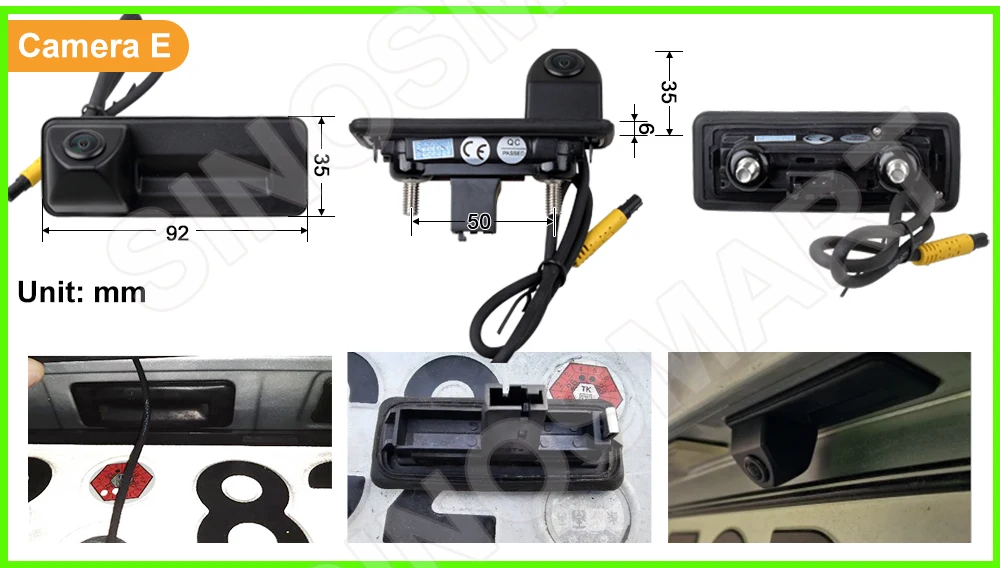
Camera E – OEM-style replacement handle camera with two optional mounting bolts
In many vehicles, these bolts are not needed.
If your original car does not use them, simply ignore them and install as normal.
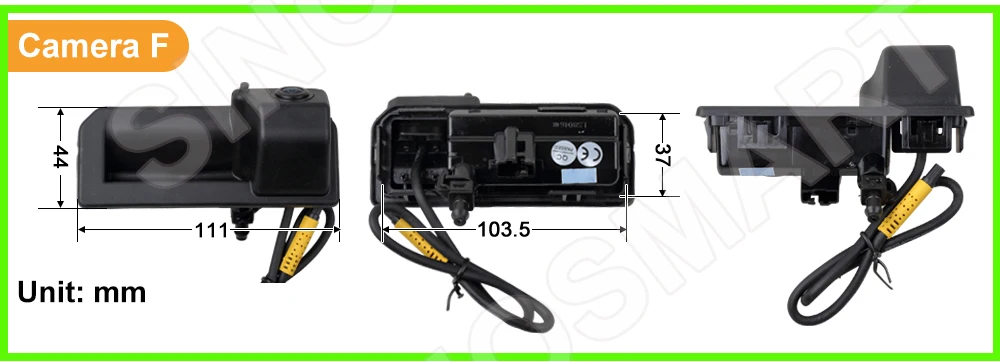
Camera F – OEM-style replacement handle camera with washer nozzle.
The outer size is the same as Camera B.
This version is intended for advanced users who can connect the washer hose by themselves.
If you are not comfortable with custom fitting, we recommend choosing Camera B instead.
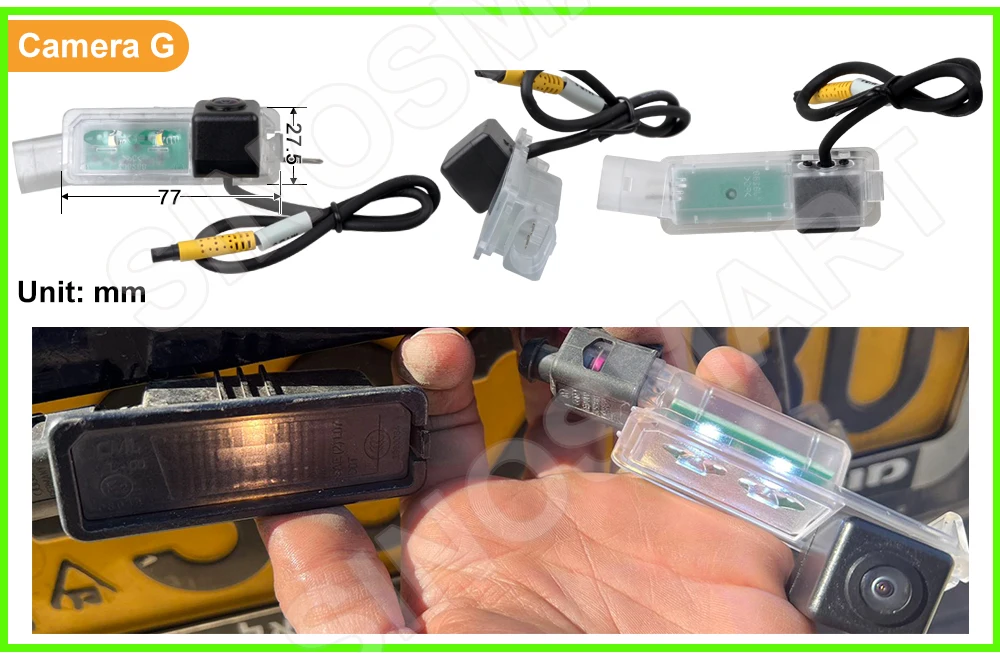
Camera G – OEM-style license plate light replacement camera with built-in LED illumination.
This version replaces one of the original license plate light units rather than the trunk handle.
Please pay special attention to the size before ordering. This version matches the license plate light size used on most Volkswagen models, but some vehicles may use a different shape or size.
If you are not sure whether your vehicle uses this style of license plate light, or if your car has a different plate light housing, please contact us before ordering for confirmation.
Please also note that some vehicles originally use halogen license plate bulbs. Because Camera G uses built-in LED lighting, the color and electrical load may differ from the original bulb.
On some vehicles, this may trigger a license plate light warning. This does not affect the camera function.
If necessary, an additional load resistor may be required to eliminate the warning.
🚗 Looking for a VW Flip Logo Camera? Click Below!
Designed for selected VW models such as Golf 7, CC, T-Roc, Passat, and some lower-trim Golf 8 versions.
It works on the same principle as our other cameras, but replaces the original VW flip-logo assembly and includes additional mechanical parts.
👉 Click below to view the Flip Logo Camera series or contact us for compatibility confirmation.
https://www.aliexpress.com/item/1005006186864779.html


💰 Price, Tax & VAT Information
Prices include VAT for buyers in: EU, UK, Australia, New Zealand, Norway, Singapore, and certain regions where AliExpress collects tax automatically.
💡 VAT is collected by AliExpress and submitted directly to your local tax authority. It is not received by the seller.
💡 Additional customs charges may apply depending on your country’s policy.
Customer Feedback and Compatibility Information
The following photos showcase successful installations by our customers from specific countries and may not apply universally.

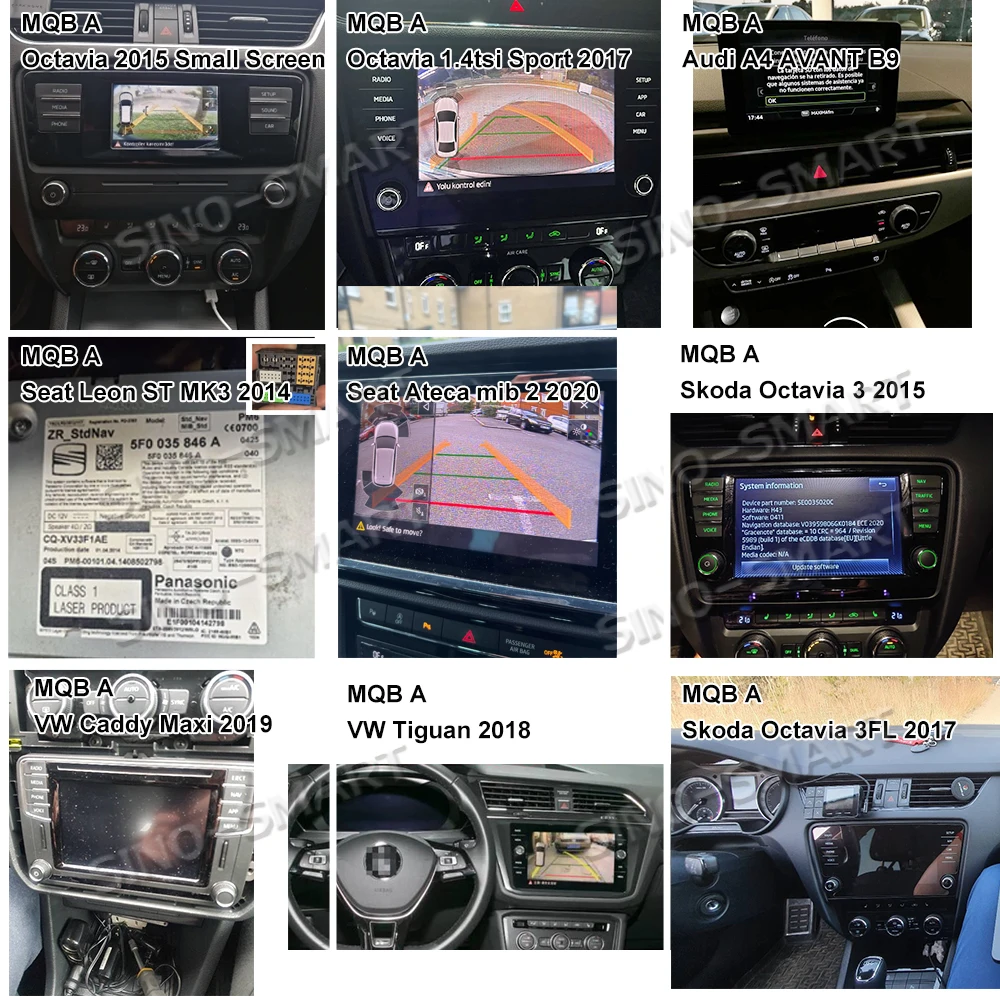
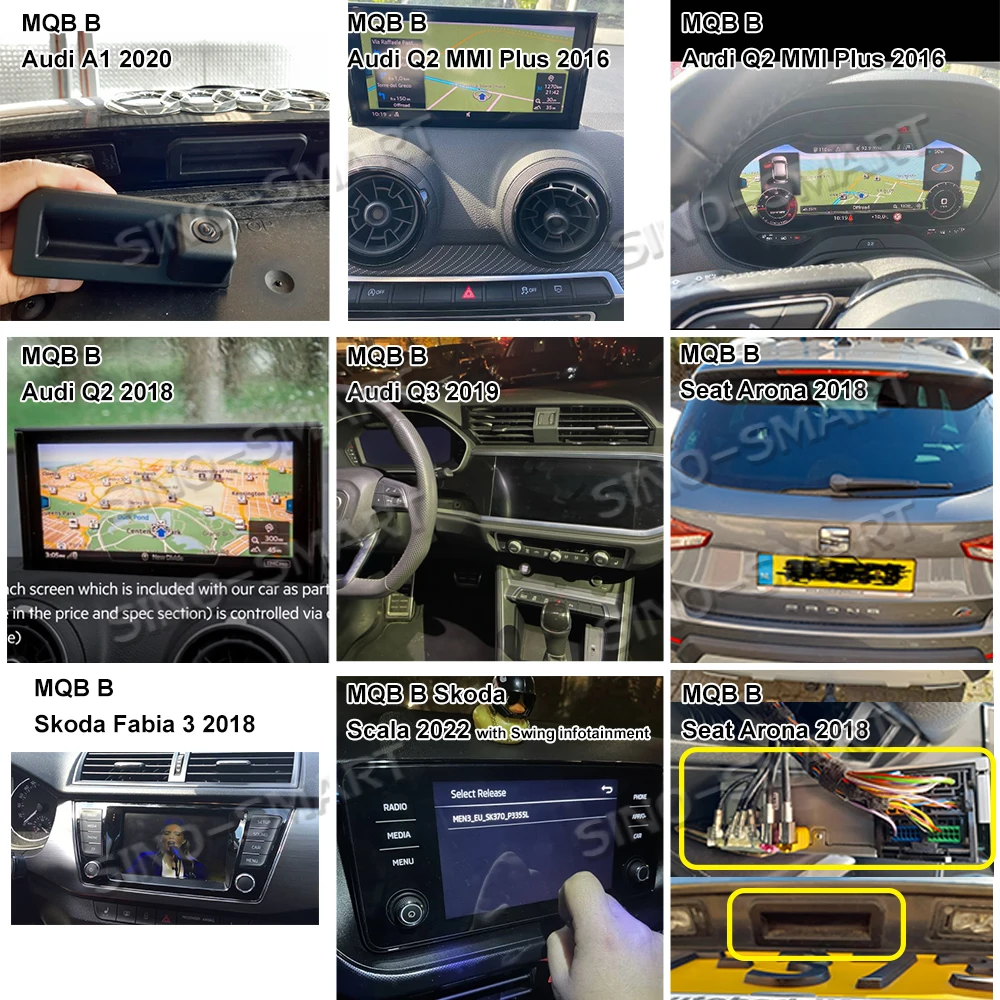
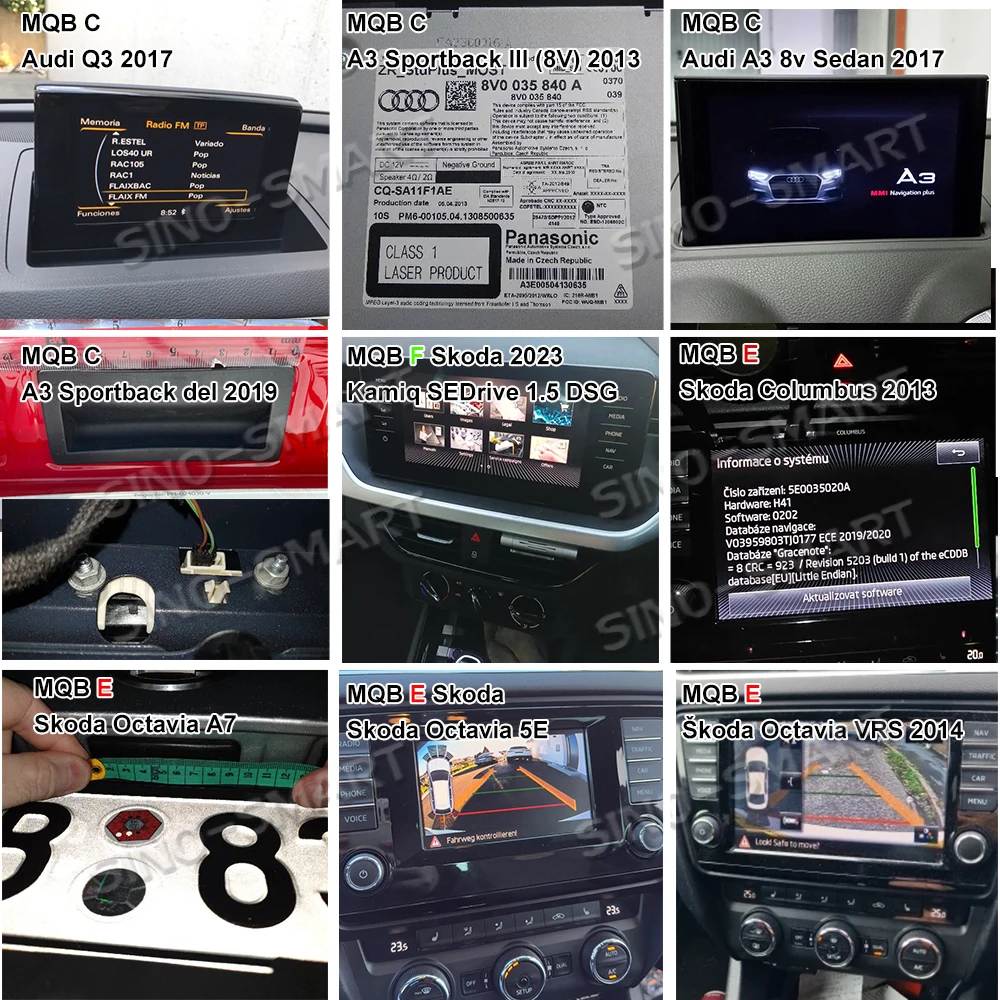
📌 Important Note on Model Year Transitions
Some models such as Audi A1, A3, Q2, Q3 (around 2019) and Skoda or SEAT/Audi vehicles from ~2013, as well as Volkswagen/SEAT vehicles from ~2015, fall within a generation transition period.
Please note that market release years may differ by region, meaning the same model year may carry different hardware depending on your country.
👉 If your car was manufactured during or near one of these transition years, we strongly recommend sending us photos of your infotainment screen and rear trunk handle for accurate compatibility confirmation before purchase.
⚠️ Compatibility Notice for Certain Entry-Level VW, Seat and Skoda Models
Some entry-level configurations of Volkswagen (VW) and Skoda vehicles may have display screens but lack the necessary video input hardware on the main unit, making it incompatible with any aftermarket rear-view camera systems.
Typical characteristics of such models include:
** Small display screens (usually 5" or 6.5")
** Basic “Composition” infotainment system
** No CD drive or media unit in the glove box (no separate main unit installed)
** Reverse gear only triggers parking sensor graphics or no video at all
These low-spec systems are commonly found in:
** Volkswagen models: Polo, T-Cross, T-Roc, Golf Trendline, Jetta, Touran, etc.
** Skoda models: Octavia, Scala, Kamiq, and similar entry-level trims
👉 If your vehicle matches the description above, please do not purchase any camera system — it will not work. If you are unsure, please send us photos of your infotainment screen and rear trunk handle for confirmation.
How to Choose the Right Camera for Skoda Octavia 3 (5E) 2013–2020
** Camera E: For models from 2013–2015 with small rear trunk handle.
** Camera A: For 2016–2020, especially 2017+ facelift models with standard MQB-size handle.
⚠️ 2016 models may vary — please send us a photo of your trunk handle before purchasing.
🚫 Incompatible Vehicles (Not Supported)
❌, Audi Q3, A5, Q5, A1 (2020 and newer)
➡️ These use MIB3 infotainment system with automotive Ethernet.
✔️ For these, visit our MIB3 Camera link.
❌, Audi A6L, A7, A8, Q8 – Not supported (MLB platform)
❌, Audi A3 – without P button.
❌, VW Touran (2015) – Not supported
❌, VW MIB2 Entry-Level Radio Units (812 819 820 Series)
❌, Skoda : without media host in glove box.
⚠️ Model-Specific Notes
** Audi A3 8V (2013–2020)
✔️ Compatible in Europe (except Sportback MJ2016)
📌 May require manual coding outside EU
** Audi A4 / A5
➡️ May need to shift into reverse gear twice for image to appear
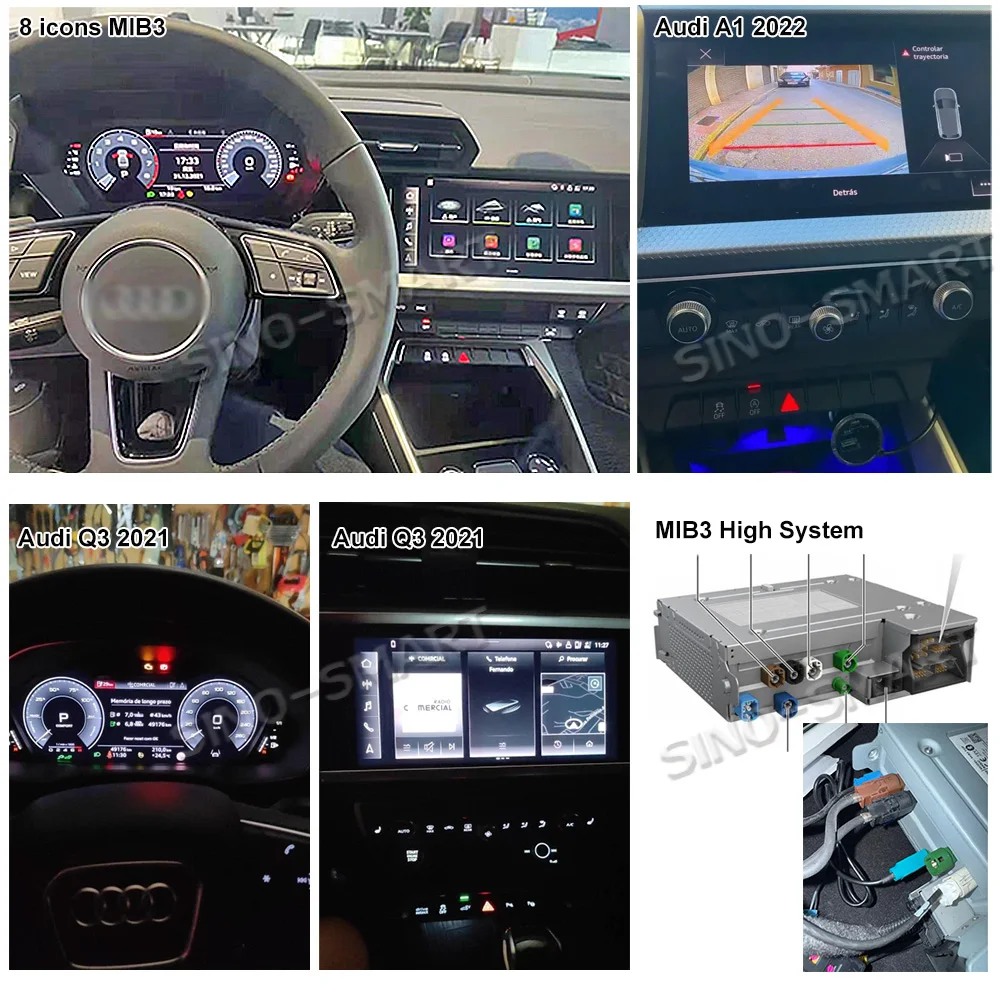
This camera is not compatible with the Advanced MIB3 radios, which is from 2020/2021
It is for new 2021 Audi Q2, Q3, A5, Q5, A1, which is with MIB3 Advanced Infotainment Platform.
The MIB3 radios we are referring to are similar to the one shown in the image below.
https://www.aliexpress.com/item/1005003697596451.html
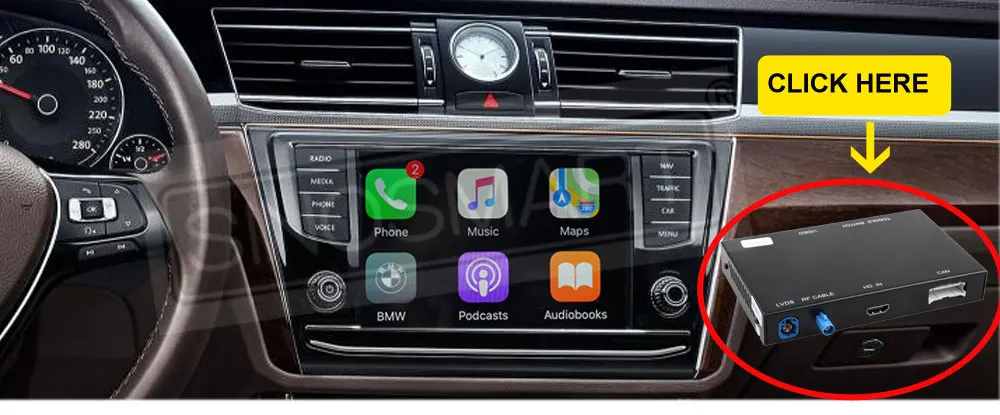
✅ Add Wireless CarPlay & Android Auto to Your OEM Screen
Looking to upgrade your factory radio with wireless CarPlay or Android Auto?
Click the link below to order the compatible smart module:
Compatible with:
VW Phaeton, Passat B8, Golf GTI, Polo (2014–2018 with OEM screen)
VW Tiguan L, Teramont (2017–2018)
🔗 Upgrade your original infotainment system quickly and easily:
https://www.aliexpress.com/item/1005005127723676.html
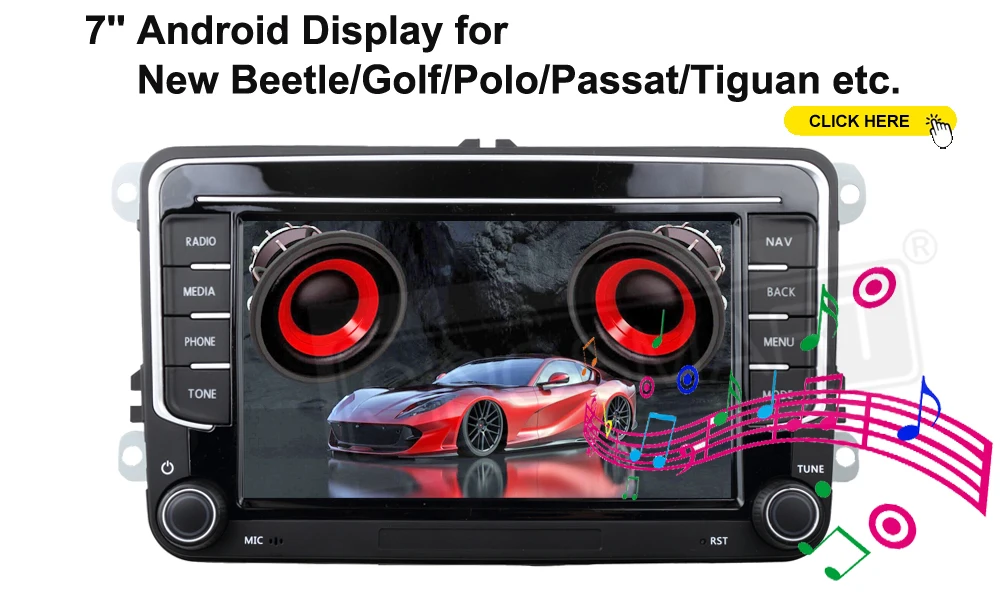
🔄 Replace Your Original Radio for a Full Modern Upgrade
If your original Volkswagen system is limited to basic radio and media playback, consider directly upgrading to a smarter Android display.
✅ Enjoy modern features like:
* Wireless CarPlay / Android Auto
* High-resolution digital reverse camera input
* Touchscreen navigation and smart apps
📌 Compatible with:
New Beetle / Golf / Polo / Passat / Tiguan (and similar models)
👉 Click here to explore:
https://www.aliexpress.com/item/2255799832590562.html
🔧 About the MQB Platform (Modular Transverse Matrix)
The following content is based on public technical documentation and internal compatibility tests.
The MQB (Modularer Querbaukasten) platform is a modular automotive architecture developed by the Volkswagen Group. It’s used across a wide range of models from Volkswagen, Audi, Skoda, and SEAT, especially for vehicles with transverse-mounted engines. First introduced around 2012, MQB provides a standardized electronic and mechanical framework, allowing better integration of modern features like reversing cameras.
✅ Key Highlights of the MQB Platform:
1. Standardized Interfaces
Shared design and wiring architecture across models (e.g., Golf, Tiguan, Octavia), enabling broader compatibility and lower cost.
2. Enhanced System Integration
Full CanBus support for dynamic trajectory lines, image triggering, and power management—all essential for reversing camera operation.
3. High-Resolution Support
Many MQB systems (e.g., 280D head unit) feature upgraded screens that provide clear, vibrant video from the camera.
4. Future-Proof Design
Designed to support evolving technologies such as MIB2/MIB3 infotainment, Ethernet networking, and smart accessory compatibility.
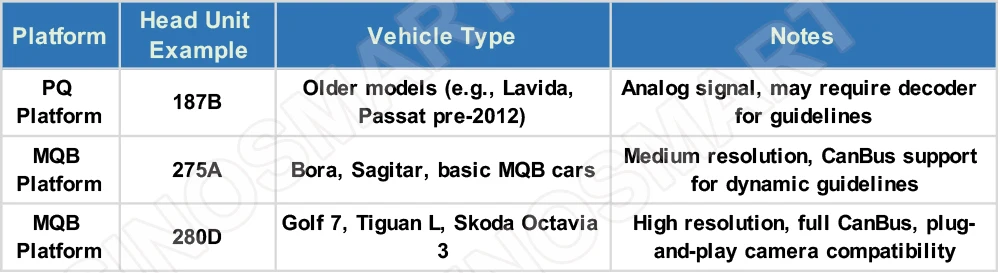
🧩 Understanding Platform Differences and Head Unit Compatibility
Our MQB series cameras (Camera A, B, C, D, E, F, G, Flip Logo types) are carefully engineered for full compatibility with 275A and 280D head units, offering plug-and-play installation, dynamic parking guidelines, and stable image transmission.
If you are unsure about your vehicle’s platform or head unit type, please feel free to send us a photo of your screen and radio label, and we’ll help you confirm the correct camera model.
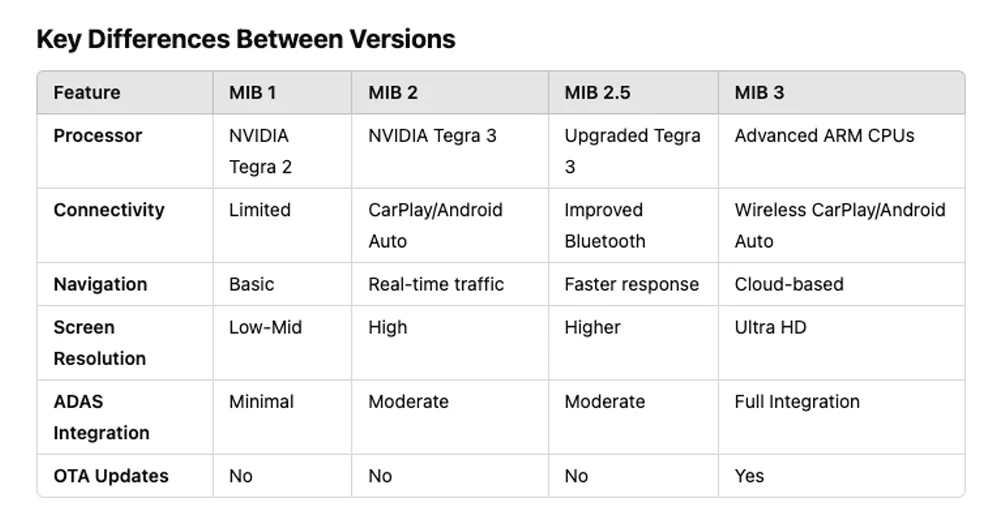
📘 MIB System Overview – Compatibility Guide for VW / Audi / Skoda / SEAT
Volkswagen Group vehicles use the MIB (Modular Infotainment Platform), first introduced in 2014 and widely adopted across Volkswagen, Audi, Skoda, and SEAT models. Choosing the correct reversing camera depends heavily on which version your car uses. Here’s a simplified breakdown:
✅ MIB 1 (2014+)
* Basic infotainment functions (radio, Bluetooth, media playback)
* Lower-resolution screens
* Based on NVIDIA Tegra 2 processors
* Compatible with our standard MQB camera systems
✅ MIB 2 (2015–2018)
* Faster UI, higher resolution screens
* CarPlay & Android Auto supported
* Based on NVIDIA Tegra 3
* Variants:
* MIB 2 Standard: Entry-level units
* MIB 2 High: Larger screens, navigation, premium audio
* Fully compatible with our MQB cameras (Camera A/B/C/D/E/F/G or Flip Logo)
✅ MIB 2.5 (~2018+)
* Intermediate upgrade with faster performance and better connectivity
* Similar hardware to MIB 2 with smoother interface
* Also compatible with our MQB camera series
⚠️ MIB 3 (2020+)
* Used in newer models like Golf 8, Leon IV, Octavia IV
* Major upgrades: cloud navigation, wireless CarPlay, OTA updates, redesigned UI
* Comes in two versions:
* Basic MIB 3: Some models still support MQB cameras (please confirm)
* Advanced MIB 3: Requires our special MIB3 camera (sold separately)
🔍 For MIB3-compatible cameras, visit: https://www.aliexpress.com/item/1005003697596451.html
If you’re not sure, please contact our sales team or search "MIB3 Camera" in our store.
⚠️ Additional Notes:
* Ethernet-Based Systems (e.g. Golf 8 Pro, ID.4, new Tiguan):
These require OEM Ethernet-enabled cameras, which are not supported by our current kits.
Please contact our team before purchasing.
* Can’t identify your system?
Send us:
1. A photo of your infotainment screen
2. Your glovebox or CD unit (label side)
3. Your vehicle model/year
…and we’ll help confirm compatibility.
* PQ Platform Warning:
Sales of PQ system cameras are being phased out. If you need one, contact us directly.
⚠️ About MIB3 Platform Differences (e.g. Golf 8)
The MIB3 platform used in models like the Golf 8 comes in several variants:
* MIB3 Basic / Entry-level
** Still relies on MQB-style camera input (such as our Camera A, B, C, D, E, F, G, or Flip Logo Camera)
** Found on lower trims with standard reversing camera support
** Often does not support high-definition or Ethernet-based video input
* MIB3 High (Pro / Discover Media / Discover Pro)
** Requires our MIB3 series camera modules
** Used in higher trims or cars with navigation and larger displays
** To find the correct model, please search for <> in our store for compatible listings.
* If you’re not sure which one to buy, please contact our online sales staff for personalized guidance.
* MIB3 with Ethernet (Gigaabit Link / GVIF / FPD-Link III)
** Used in the latest high-end Golf 8 or ID-series models
** Requires a special Ethernet-enabled OEM camera — not currently supported by our camera kits.
** Please contact our online team for advice on this configuration.
To determine the correct version, we strongly recommend checking:
** The infotainment model number (label on the CD/media unit) — you may need to temporarily remove the head unit to inspect the label on the top or side
** The rear connector ports (video pin availability)
* Whether an existing camera or Ethernet link is installed
🚗 About Volkswagen’s Ethernet-Based Systems & MIB3+ Head Units
Volkswagen Group’s latest infotainment platforms (especially MIB3 and newer) have introduced Automotive Ethernet—a next-generation communication standard that replaces or supplements traditional CAN bus systems. This allows for higher bandwidth, lower latency, and more reliable data transmission, enabling the following:
* High-Resolution Reversing and Surround Cameras
Faster, sharper video feeds with minimal lag.
* ADAS (Advanced Driver Assistance Systems)
Supports parking sensors, radar modules, lane assist, etc.
* Modern Infotainment Systems
Enables high-definition displays, real-time streaming, and over-the-air (OTA) updates.
This future-proof architecture enhances both driving safety and user experience across many new VW/Skoda/Audi models.
🔧 Common Models Using Ethernet-Based Infotainment:
* VW Golf 8 / Golf 8.5
* VW Passat (late MIB3 models)
* VW Tiguan (post-2021)
* VW Arteon (2021+)
* VW Atlas
* Skoda Kodiaq (newer MQB Evo builds)
⚠️ Important: These systems usually require a special Ethernet-enabled OEM camera and are not compatible with our standard MQB camera kits.
Please contact us if you’re using one of these vehicles, or search “MIB3 Camera” in our store.
Let us help you choose the right solution! Feel free to message us with your vehicle model, year, and infotainment photo/label.
📦Important Information
1. Stock & Fast Dispatch
All products available for purchase are normally in stock and ready for dispatch.
Although AliExpress may display a longer estimated handling time due to platform policy updates, most orders are dispatched within 48 hours after payment confirmation.
2. Please Check Your AliExpress Messages
Automotive products are different from ordinary consumer goods. Compatibility may vary depending on the vehicle model, model year, trim level, original equipment, or regional version.
To help you receive the correct product, we carefully review every order before shipment. If any information needs to be confirmed, we will contact you through AliExpress Messages.
Please check your AliExpress Messages after placing your order and reply if we contact you.
If you have any questions, special requests, or additional vehicle information, please leave us a message before or after placing your order. We carefully read every customer message before shipping and will respond as soon as possible.
3. Delivery Address
To help avoid shipping delays, please make sure your delivery information is complete and accurate, including:
• Full Name
• House/Building Number
• Street Address
• City
• ZIP/Postcode
• Phone Number
Due to AliExpress privacy protection, some customer information may not be fully visible to sellers. If additional information is required, we will contact you through AliExpress Messages.
4. Import Duties & VAT
Import duties, VAT, customs fees, and other local taxes are determined by your country’s customs regulations and may vary by destination.
These charges are beyond our control and cannot be predicted in advance.
If you have any special invoice requirements, please contact us before shipment.
5. Technical Support
If you need assistance with compatibility, installation, coding, or product operation, please feel free to contact us through AliExpress Messages.
Our business hours are:
Monday – Friday
08:00 – 18:00 (China Time, UTC+8)
Due to time zone differences, replies outside business hours may take a little longer. However, we normally respond within 24 hours.
6. Shipping
For most destinations worldwide, AliExpress Standard Shipping (Cainiao) provides fast, reliable delivery with full tracking.
In many countries, delivery performance is comparable to commercial courier services while offering excellent overall value.
Unless you require urgent delivery, we recommend AliExpress Standard Shipping.
7. Your Feedback Matters
Every customer experience helps us improve.
Whether your feedback is positive or suggests areas where we can do better, we sincerely appreciate your review and product photos.
Your feedback helps other customers make informed purchasing decisions and helps us continuously improve our products and services.
Thank you for supporting the SINOSMART community.
✅Warranty & After-sales Support
All SINOSMART products include a 1-year standard warranty.
If AliExpress provides a longer warranty or buyer protection period for your order, we will always follow the applicable AliExpress policy.
If you experience any product issue, please contact us through AliExpress Messages before opening a dispute whenever possible.
Our technical support team will work with you to identify the cause and provide the most appropriate solution based on the specific situation.
Many issues can be resolved through troubleshooting without returning the product, saving both time and shipping costs.
Our goal is always to provide a fair, efficient, and satisfactory solution for every customer.
Brand Story – SINOSMART
Founded in 2009, SINOSMART is a trusted name in automotive electronics, specializing in OEM-style navigation systems, reversing cameras, and vehicle integration solutions.
With over 10 years of experience and thousands of satisfied customers on AliExpress, we’re committed to delivering:
* Smart Products – Designed to match original factory systems
* Reliable Performance – Tested for long-term durability
* Fast Global Shipping – Direct from AliExpress official warehouses
* Responsive Support – Real engineers, real answers, fast response
We believe that great products start with great communication.
Tell us your car model and needs — we’ll recommend the best solution for you.
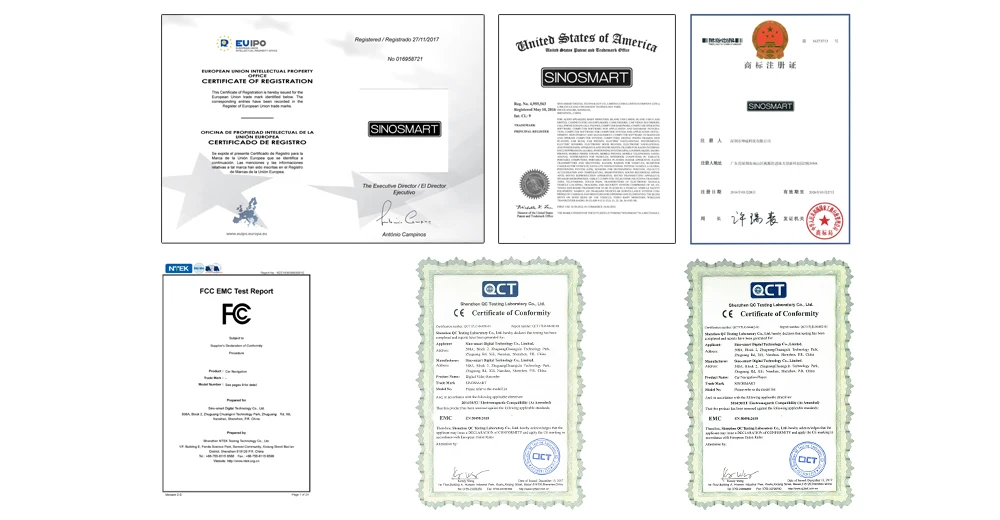
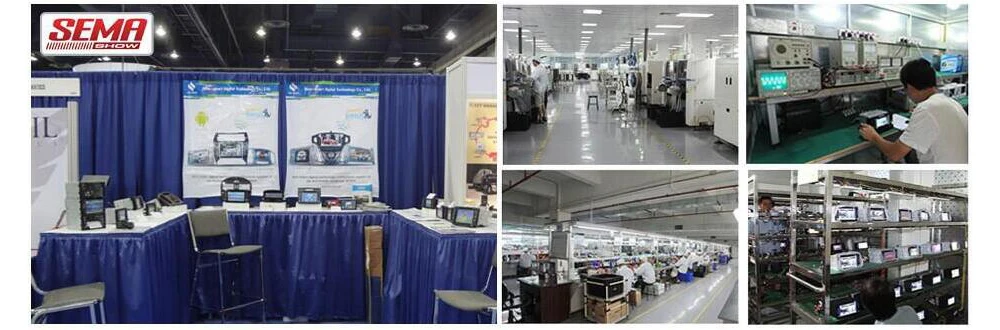
Brand Story – SINOSMART
Founded in 2009, SINOSMART is a trusted name in automotive electronics, specializing in OEM-style navigation systems, reversing cameras, and vehicle integration solutions.
With over 10 years of experience and thousands of satisfied customers on AliExpress, we’re committed to delivering:
* Smart Products – Designed to match original factory systems
* Reliable Performance – Tested for long-term durability
* Fast Global Shipping – Direct from AliExpress official warehouses
* Responsive Support – Real engineers, real answers, fast response
We believe that great products start with great communication.
Tell us your car model and needs — we’ll recommend the best solution for you.